
Client
Challenge
Solution
Delta
From analog product to a digital one - Bridging the gap between tradition and technology by replacing a bulky physical catalog with a smart, personalized digital solution for field agents
A cross-platform MVP (Tablet & Mobile) that empowers field agents with real-time inventory updates, personalized client views, and streamlined sales processes

UX Research
|
Information Architecture
|
UX/UI Design
Inefficient
Agents had to manually write down orders and later re-type them into the system. This "double work" was time-consuming and prone to human error.
Static
Printed months in advance, the catalog couldn't reflect real-time supply chain changes. If a shipment was delayed at sea, the catalog became misleading the moment it was opened.
One Size
Every agent carried the same heavy book. There was no way to personalize the experience - for example, a men's-only store still had to flip through pages of baby clothes to find what they needed.
As I dived into the research study, I discovered the
key pain points:

The Human Factor
Field Agents Manager
"The physical catalog is our safety net. For a digital tool to replace it, we have to be able to trust it."
2. Decoding Needs, Bridging Gaps
Research & Strategy
Moving from years of paper to a digital screen isn't just a technical shift; it’s a psychological one.
First, I conducted In depth sessions with the Wholesale Market Manager (Business perspective) and the Field Agents Manager (User perspective) to map out the current sales flow and identify problems.
The Field Agents Manager was initially skeptical, fearing that a digital tool might fail during a high-stakes client meeting, or lack the "reliability" of a physical book.

Wholesale Market Manager
"As long as it works well, it's an excellent solution to the reliability problems that the physical catalog has, when there are changes in inventory due to delayed shipments."
The Strategy
I treated both of their inputs as high-priority requirements. I focused on building a UI that ensured the transition didn't subtract any value, but only added efficiency and "Digital Confidence."


Current User Journey Mapping: The Sales Agent
To create the new user journey, in addition to conducting interviews and study the printed catalog, I analyzed the current "Day in the Life" of an agent:
The agent needs to know what are the relevant product\categories to the specific client (client group), and mark those manually in the printed book
The agent arrives to the meeting with the printed catalog
Goes straight to the relevant category for that customer.
The customer browses the catalog, asks questions about the products or inventory.
The customer selects products. If a product that appear in the catalog is out of stock for various reasons (import delays, etc.), the agent will suggest other products instead.
The agent writes the customer's choices manually
And then types them into the online system.
The Strategy
Focusing on allowing the agent to stay fully engaged in the sales meeting and build relationships, rather than being distracted by searching for information or avoiding mistakes. This, by Creating a personalized, up-to-date product, with a clean, intuitive interface that handles the 'heavy lifting' of data information and filtering, and reduces manual errors.
Ouch!
Time consuming (before, during and after the meeting).
The catalog cannot be personalized to a specific customer.
Static (printed) and not adaptable in real time.
No information about fabric technologies, just an icon.
Causes "human" errors.
3. Digitizing User Experience
The Solution

Information Architecture
Organizing Complexity: Managing a vast database of thousands of products required a strategic approach to Information Architecture. I designed a hierarchical filtering system where the Client Group serves as the primary anchor. This selection dynamically shapes all subsequent filters - including Season, Brand, and Gender - ensuring that field agents are only presented with data relevant to their specific meeting. By transforming disorganized information into a structured, cascading hierarchy, I eliminated information overload and created a high-speed navigation experience that builds 'Digital Confidence' in the field.
Context-Aware Navigation: Maintaining Flow
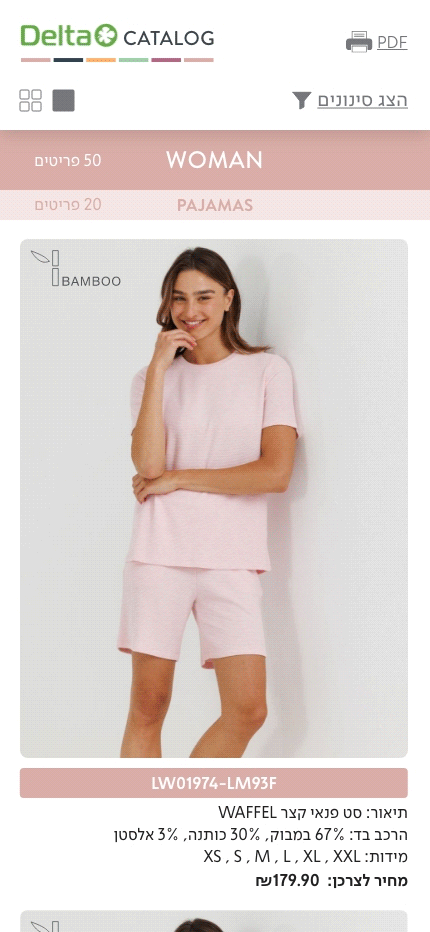
To ensure seamless orientation within a vast product range, I designed a fixed-anchor navigation system. While the primary category (e.g., WOMEN) remains constant at the top, sub-categories (e.g., Pajamas, Lingerie) unfold in a continuous, logical sequence. Each section is supported by real-time metadata, including specific 'Entry' dates and total item counts. This structure allows agents to transition instinctively between product groups without losing their place, transforming a complex database into a fluid, user-friendly sales journey.

Category
Season
Entry
Sub Category
Products Quantity

Product Storytelling: Beyond the Icon
In the physical catalog, advanced fabric technologies (like Bamboo or Modal) were represented by small, static icons with no context.
To elevate the perceived value of the product, I transformed these icons into interactive touchpoints. Users can tap any technology icon to trigger a contextual pop-up that explains the fabric's unique benefits.
This 'Information on Demand' approach provides agents with instant talking points to justify quality and price, without cluttering the main interface. A simple tap outside the pop-up returns the user to the grid, maintaining a fast and frictionless browsing experience.
Personalized Content: Cascading Filter
To eliminate information overload, I designed a hierarchical filtering system where the 'Client Group' serves as the primary anchor. This selection dynamically shapes the entire catalog, showing only relevant collections and inventory. This 'Cascading Hierarchy' ensures agents never waste time on irrelevant products, creating an effective sales experience.


4. MVP Product As A Starting Point
From Vision to Launch
I worked closely with the development team to understand budget and technical limitations, ensuring the design is solving core problems.
While the initial vision for the product included full e-commerce capabilities - such as an integrated shopping cart and checkout system - we had to pivot due to time and budget constraints.
Rather than delivering a complex but unpolished tool, I advocated for a Minimum Viable Product (MVP) approach. We focused on perfecting the core experience: a robust, reliable, and high-speed digital catalog that solves the primary friction for agents in the field. This strategic decision provided a solid foundation for future features, ensuring a successful launch and immediate user adoption while paving the way for further digital evolution.
NOW
Smart Filtering
Real-time Inventory
Product Education

THE VISION
Digital Cart
Direct Order Submission
Payment Gateway

The Strategy
Balancing ambitious user needs with technical feasibility, prioritizing high-impact features for a successful MVP launch.
4. Responsive Design
Tablet vs. Mobile
Home Page


Choose Client group


Choose Filters


Show Results


Grid

1. Moving from Analog to Digital
The Challenge
For years, Delta's wholesale agents relied on a massive printed catalog, to present to clients with different needs and requirements. While iconic, this physical format was outdated and created significant bottlenecks in the fast-paced world of retail.
